Key Takeaway
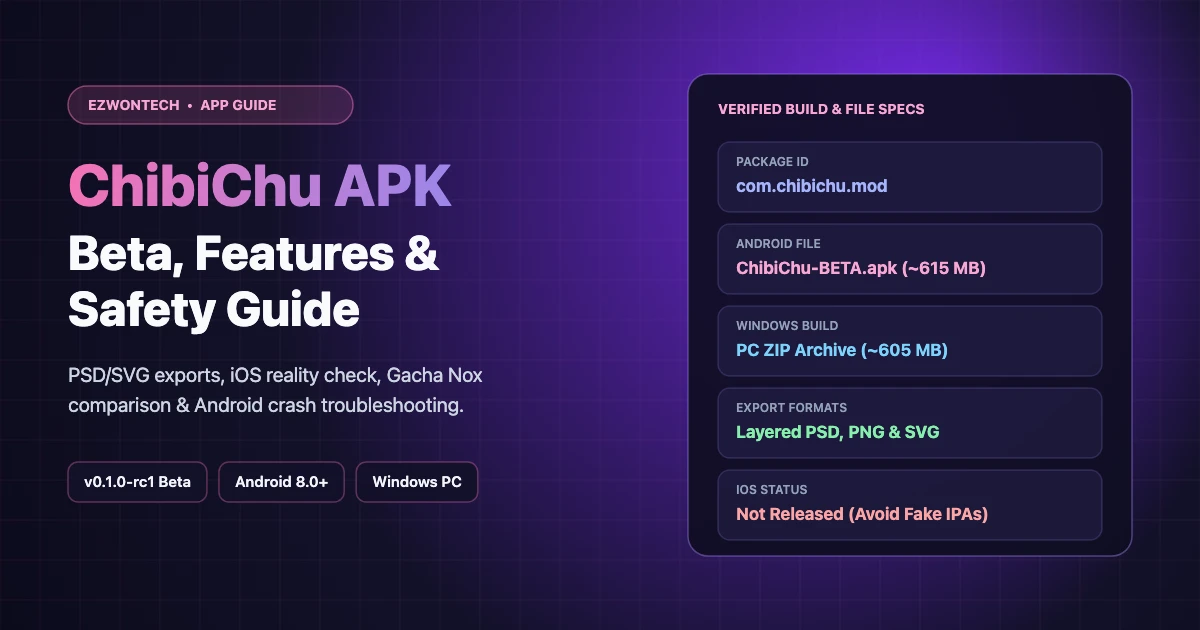
ChibiChu APK (ChibiChu-BETA.apk, build v0.1.0-rc1) is a fan-made Unity rebuild and creative expansion of Gacha Life created by milkachuu with guidance from Gelu Gacha. It runs natively on Android (8.0+) and Windows PC, stands out for exporting layered PSD, PNG, and SVG character files, and does not have an official iOS version yet.
If you noticed ChibiChu APK blowing up across social feeds and search trends this week, you are probably trying to figure out three practical things: what the app actually does differently from other Gacha mods, whether the 615 MB Beta build is safe for your phone, and why so many sketchy sites promise an iOS version that never works.
Most pages ranking for chibichu-beta.apk or chibi chu mod copy the same thin summary without testing compatibility or explaining the difference between the real fan project and lookalike puzzle apps. Here is the complete, honest breakdown—including an instant pre-install compatibility checker and troubleshooting fixes.
What Is ChibiChu (And Don’t Confuse It With “Chibi Chuu”)
ChibiChu (often searched under ChibiChu Mode or common spelling variations like chibihu, chibicu, chubichu, and chibuchu) is an independent, ad-free fan project inspired by Lunime’s Gacha Life. Rather than patching an old Flash/AIR runtime, developer milkachuu (assisted by Gelu Gacha) rebuilt the studio experience inside the Unity game engine.
Why does that matter? Because Unity unlocks smoother zoom controls, cleaner asset rendering, custom bone/pose adjustments, and professional export formats that older mods simply cannot output.
Important Disambiguation: If you search Google Play and see a cozy 3D merge puzzle game named “Chibi Chuu” by developer Hexhound, that is an unrelated puzzle game—not the ChibiChu Gacha character studio mod.
ChibiChu APK & Windows Beta Specifications
Before downloading a large sideloaded file, verify that the package name and file size match the authentic beta release instead of a lightweight adware clone:
| Specification | Android Beta (APK) | Windows PC Beta |
|---|---|---|
| File / Build | ChibiChu-BETA.apk (v0.1.0-rc1) | ChibiChu.exe inside ZIP archive |
| Download Size | ~615.3 MB | ~605.6 MB |
| Package ID | com.chibichu.mod (Standalone) | Portable folder extraction |
| Minimum OS | Android 8.0+ (3 GB+ RAM ideal) | Windows 10 / 11 (64-bit) |
| Monetization | Free & ad-free fan project | Free & ad-free fan project |
Because the package ID is com.chibichu.mod, installing the ChibiChu Beta APK will not overwrite your existing Gacha Life or Gacha Club saves.
Pre-Install Compatibility & Crash Checker
Because the 615 MB Unity package unpacks heavy character assets on first launch, many phones hit black screens or “App Not Installed” errors. Check your device before downloading:
5 Standout Features Creators Actually Use
Unlike basic asset-swap mods that only drop in extra shirts or hair presets, ChibiChu focuses on workflow tools that Gacha editors, animators, and digital illustrators actually need:
- Layered PSD, PNG & SVG Exports: This is ChibiChu’s biggest breakthrough. Instead of taking messy screenshots and erasing backgrounds by hand, you can export characters with transparent backgrounds or separate editable layers (
.psdand vector.svg) directly for Photoshop, ibisPaint X, or Clip Studio Paint. - Custom Pose Editor: Fine-tune limb angles, layering depth, and expressions directly instead of feeling boxed into static preset slots.
- Unity Engine Smoothness: Switching away from legacy Adobe AIR eliminates much of the UI stutter when managing high-detail accessories and scenes.
- Granular Color & Outline Controls: Adjust outline shades and tint curves independently for cleaner anime-style shading.
- Standalone Installation: Runs side-by-side with your existing Gacha apps without wiping old character slots.
ChibiChu vs. Gacha Nox vs. ChibiMation vs. Gacha Nebula
If you follow the Gacha modding scene, you have probably seen Gacha Nox, Gacha Nebula, and ChibiMation trending alongside ChibiChu. Here is how they genuinely compare:
| Project | Core Focus | Pro Asset Export | Best For |
|---|---|---|---|
| ChibiChu (Beta) | Unity rebuild of Gacha Life + custom posing | Yes (PSD, PNG, SVG) | Editors, artists & layered thumbnails |
| ChibiMation | Standalone Gacha-inspired studio & animation | Studio frames & custom rigs | Gacha mini-movie animators |
| Gacha Nox / Nebula | Massive wardrobe & aesthetic Gacha Club mods | Standard screenshots | Hundreds of trendy outfits & props |
iOS, itch.io, APKPure & Safety Check (Read Before Downloading)
Because ChibiChu is not on the Google Play Store or Apple App Store, searches for apkpure chibichu, chibichu.ru, itch io, and chibichu ios spike every time a new creator showcase goes viral. Keep these four safety rules in mind:
- No iOS Version Exists: Any page claiming to give you “ChibiChu IPA for iPhone/iPad” after installing two sponsor apps is misleading you. Stick to Android or Windows PC.
- Verify the Creator’s Channel First: Independent Gacha mods are normally posted through the developer’s official Telegram/social release hubs or indie distribution pages like itch.io—not random pop-up download buttons.
- Check Package Size & Name: The real
ChibiChu-BETA.apk(v0.1.0-rc1) is roughly 615 MB and uses package IDcom.chibichu.mod. A tiny 12 MB APK with the same name is almost certainly adware. - Scan Before Installing: Upload the file or check its SHA-256 checksum on VirusTotal before granting Android’s “Install unknown apps” permission (see Google’s Android App Security Guidelines).
How to Fix ChibiChu APK Errors (“App Not Installed” & Black Screen)
- Stuck on a Black Screen at First Launch: This is normal on the very first run while Unity unpacks ~615 MB of character textures. Wait 60–90 seconds without tapping Back or force-closing.
- “App Not Installed” Error: Make sure you did not accidentally download the Windows
.zipfile instead of the.apk, confirm you have at least 2 GB of free storage, and uninstall any older prototype test build if package signatures conflict. - Crashes Inside Studio Mode: Close background apps (especially browsers and social apps) on 2–3 GB RAM phones before opening high-layer scenes.
- Windows SmartScreen Popup on PC: Extract the full
.zipfolder first (never double-clickChibiChu.exeinside an unextracted zip). Since indie builds lack paid Microsoft code-signing certificates, scan the extracted folder with Windows Defender or VirusTotal before clicking More info → Run anyway.
Looking for more safe Android troubleshooting and app reviews? Browse our step-by-step tech guides and app reviews on EzWonTech.
Frequently Asked Questions
Is ChibiChu APK available on Google Play Store or iOS App Store?
No. ChibiChu is an unofficial fan project built in Unity for Android (sideloaded Beta APK) and Windows PC. There is no official iOS IPA or Google Play release for the mod (the Google Play app “Chibi Chuu” by Hexhound is an unrelated puzzle game).
How big is ChibiChu-BETA.apk and why is it over 600 MB?
The v0.1.0-rc1 Beta APK is roughly 615.3 MB (and the Windows ZIP is ~605.6 MB) because it bundles the Unity engine runtime alongside high-resolution character assets and layered PSD/SVG export libraries.
Will installing ChibiChu APK delete my Gacha Life or Gacha Club characters?
No. ChibiChu uses its own standalone Android package name (com.chibichu.mod), so it installs separately without overwriting official Lunime games or Gacha Nox.
Why does ChibiChu show a black screen when I first open it?
On first launch, Unity needs 60 to 90 seconds to unpack textures and build local cache files. Wait patiently on the initial screen, and ensure your phone has at least 2 GB of free internal storage.
What is the difference between ChibiChu, Gacha Nox, and ChibiMation?
Gacha Nox focuses on adding hundreds of clothing and prop assets inside Gacha Club, ChibiMation is a standalone animation-oriented studio project, and ChibiChu rebuilds Gacha Life in Unity with custom posing plus layered PSD, PNG, and SVG exports.